Analytics your agent can read, act on, and learn from.
Private web analytics with Search Console and Bing data. One self-hosted binary. Add a site with one prompt. Ask over MCP. Measure every change your agent makes.
Checkend is not released yet. See the status.
Copy one prompt. Your agent does the rest.
- Type the domain in Checkend.
- Copy the prompt into Claude Code, Cursor or any coding agent.
- Watch the first event arrive live.
Add Checkend analytics to this project.

Site: example.com
Checkend server: https://stats.example.com
Install token: ce_inst_•••••• (expires in 24 hours)
The install token can only check the install of example.com
and send a test event. It cannot read the analytics.

1. Find the framework and the root layout.
2. Add this tag to the <head>:
   <script defer data-site="example.com"
     src="https://stats.example.com/js/script.js"></script>
3. Add goal events for the signup and purchase forms.
4. Optional: add the first-party proxy route.
5. Deploy, open a page of example.com, then run:
   ce sites verify example.com
Built for agents. Checked by people.
Install
Your agent adds sites and goals with one pasted prompt. The install token can only check its own site.
Read
"Which pages lost signups this month?" Answers come with the data date, the sample size and the previous period.
Act and learn
Your agent records each change. Checkend measures the result and keeps it, so that the next agent run knows what worked.
Checkend is the memory of your agent.
Agents do not remember between runs. Checkend keeps what each agent tried on each site, and what the numbers did next.
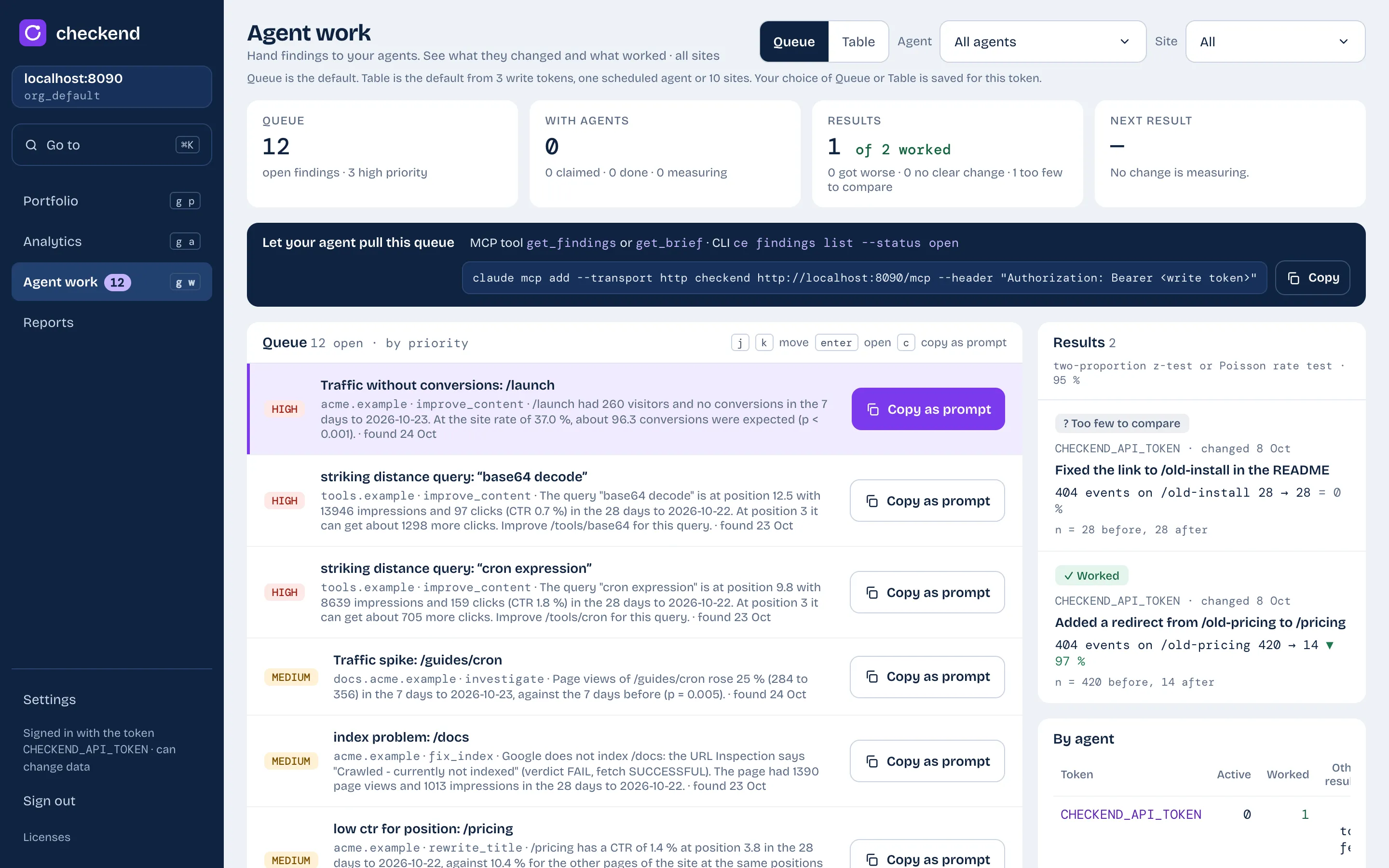
- Finding
A rule finds a fact with numbers. For example: a page in position 8 to 20 with many impressions.
- Change
Your agent claims the finding, makes a change and records it as an annotation.
- Outcome
Checkend compares 14 days before and after with a significance test: worked, no clear change, got worse, or too few to compare.
- Memory
The brief gives the next agent run the open findings, the recent changes and their outcomes.
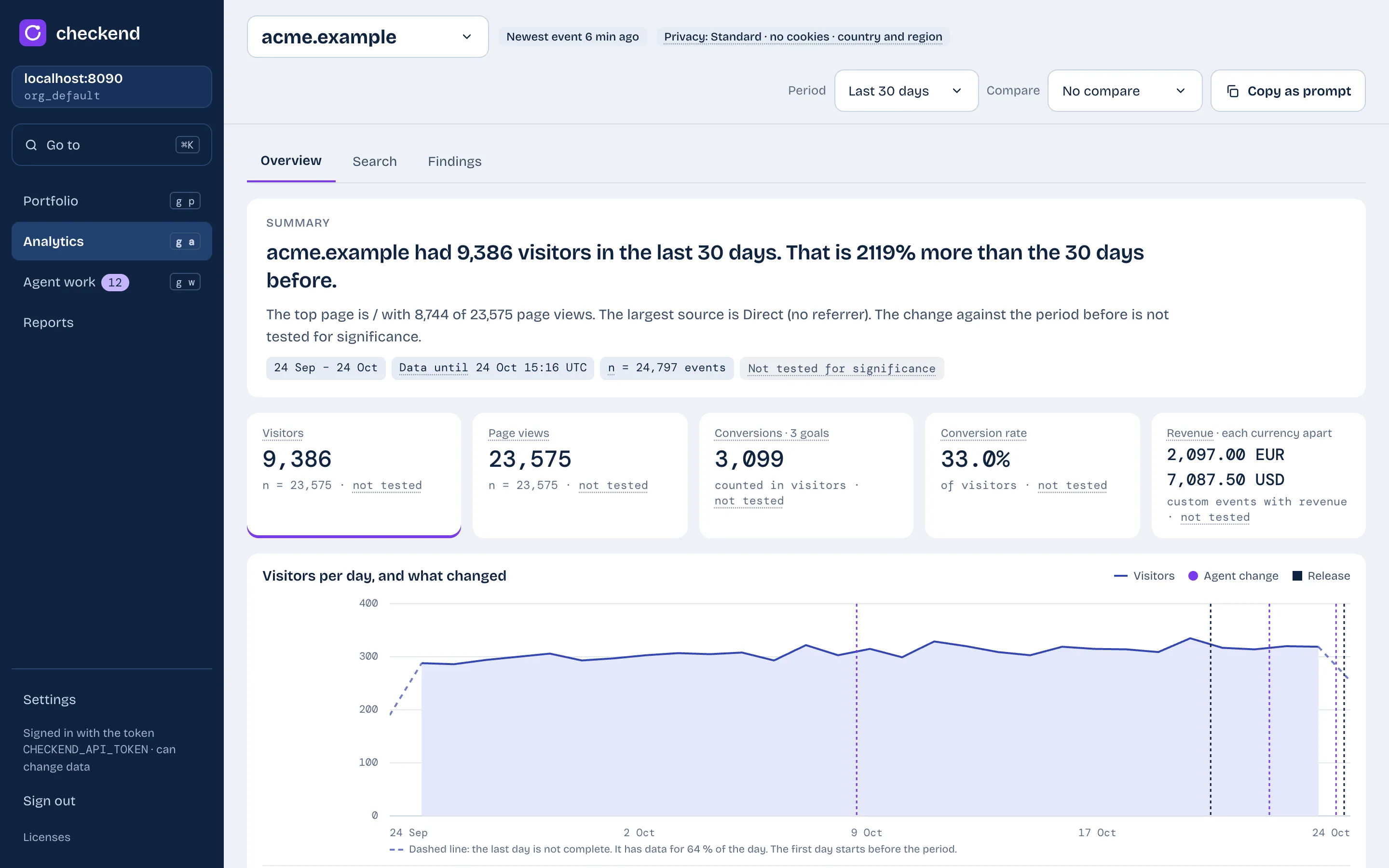
Every number shows its date and its sample size.
The dashboard says what changed in plain sentences. Agent changes and releases show on the chart, so you see what happened after each one.
One page for every site you own.
| Site | Visitors | Conversions | Top finding |
|---|---|---|---|
| example.com | 48,210 +6% | 612 −9% | Low CTR on /pricing |
| docs.example.com | 22,940 +14% | — | 3 pages in striking distance |
| example.org | 6,104 −18% | 88 −21% | Content decay on /guides |
The numbers are an example. Search Console and Bing queries show next to visits and conversions, and Checkend keeps the search history after the 16 months of Google.
Four ways in. One set of numbers.
MCP, the CLI and the REST API use one query core, so each interface gives the same answer. Claude, ChatGPT, Cursor, Codex or a local model: any client works.
Ask in your agent
Give the client the URL of the server. You approve the access in the browser with a passkey.
https://stats.example.com/mcp
tools: query, get_brief, get_findings,
update_finding, annotate, …ce, for terminals and CI
Readable output on a terminal. On a pipe, one JSON value and clear exit codes.
ce brief example.com
ce findings claim <id>
ce annotate example.com "New title on /pricing" \
  --finding <id>
A documented API
The web UI uses the same API. The OpenAPI document comes from the code.
curl -H "Authorization: Bearer ce_…" \
  https://stats.example.com/v1/brief?site=example.com
Wake your agent up
Signed webhooks tell a scheduled agent about new findings, changes and reports.
finding.created   finding.updated
annotation.created   report.ready
Analytics first. The rest is coming.
All modules will share one timeline, one query core, one MCP server and one CLI. Analytics is the first module.
Analytics
Private web analytics, goals and revenue, Search Console and Bing, web vitals and AI crawler hits.
Errors
Planned: error tracking through the Checkend SDK. One SDK and one key for all modules. Move from another tool with one line.
Uptime
Planned: endpoint checks from many regions.
Logs
Planned: log ingest, archive and search.
Privacy is a setting, not a promise.
Select a mode for each site. The dashboard tells you what each mode collects.
Standard: no cookies. A visitor hash with a salt that Checkend deletes each day. Country and region only.
Checkend never stores an IP address. Do Not Track and Global Privacy Control use strict mode.
One binary on one server.
curl -fsSL [INSTALL_URL] | sh
Automatic TLS, backups, data retention and a disk guard. No database server to run. Your data stays on your server.
Self-host CheckendCheckend calculates facts. Your agent does the thinking.
Privacy. Data goes to an AI provider only when your own agent asks for it.
No keys, no token bills. Checkend has no model, no model keys and no model calls.
No lock-in. Use any agent that speaks MCP, runs a CLI or calls HTTP.
Trust. Checkend cannot invent a number.